










Solutions
Explore how to grow

If your team works with files on one platform, meetings on another, approvals over WhatsApp, and emails from free accounts, you do not have a software problem. You have a growth problem.
Need help with this? Discover our web design that converts.
That disorder translates into campaigns that go out late, decisions made with different versions of the same document, and an operation that becomes fragile precisely when the business needs speed. For an eCommerce or an expanding B2B company, that internal friction ends up affecting sales, conversion, and customer experience.
When someone searches for what gsuite is, they usually expect a simple definition. That answer is no longer enough. G Suite, now Google Workspace, should not be evaluated as a collection of apps. It should be evaluated as the operational foundation of a company that wants to coordinate better, execute faster, and sustain growth without multiplying complexity.
The scene is familiar. The sales team uses its own calendar. Marketing stores creative assets in personal folders. Management asks for a report and receives three different versions. Meanwhile, emails keep going out from accounts that do not convey trust.
That holds the business back quietly. Not because tools are missing, but because there are too many disconnected systems.
Google Workspace, formerly called G Suite, fits better when understood as an operational ecosystem for digital companies. It does not start from email. It starts from a more important question: how do you make information, people, and decisions move without friction.
In Chile, this transition is no longer marginal. G Suite, now Google Workspace, was launched in 2006. By 2020, more than 70% of medium and large companies in Santiago had already migrated to these platforms, with annual growth of 25% in adoption since 2016, driven by the pandemic that increased video calls by 300% via Google Meet, according to this analysis of the evolution of G Suite in Chile.
A digitally organized company does not just work more comfortably. It works with greater responsiveness.
If your operation depends on people who “know where everything is,” you do not have a system. You have a vulnerability.
That same criterion applies when you compare internal communication platforms. If you want to dig deeper into how this model coexists with team messaging, it is worth reviewing what Slack is and how it integrates into a modern operation.
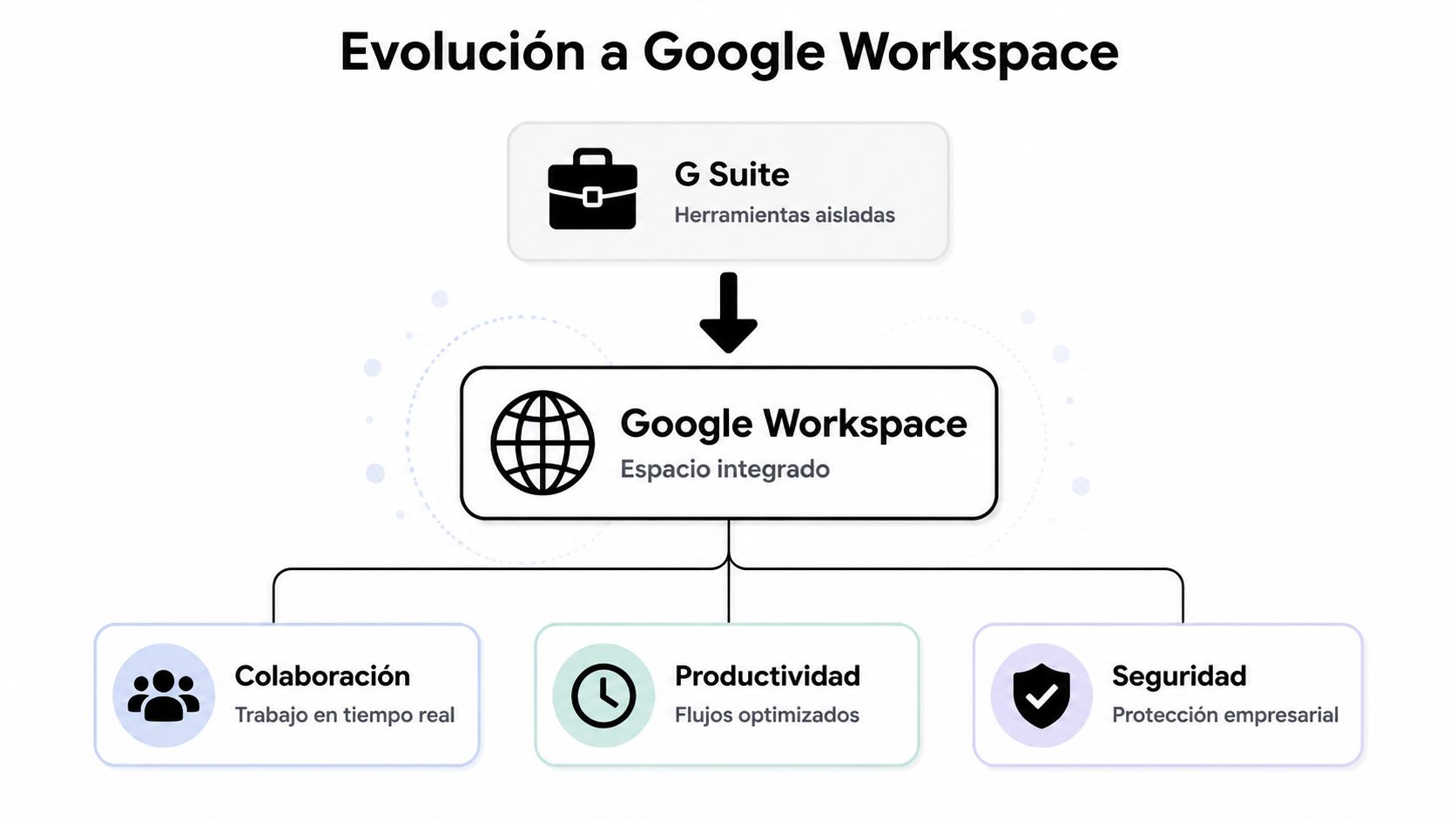
The name change was not cosmetic. G Suite described a suite of applications. Google Workspace describes an integrated workspace. That difference matters.
The clearest way to understand it is this. G Suite was a toolbox. Google Workspace is an integrated operations workshop. In a toolbox you have useful parts. In a well-designed workshop, the parts work together.
Gmail, Meet, and Chat are not just channels. They function as the business’s daily interaction layer.
When a company centralizes its communication in a single environment, it reduces loss of context. An email leads to a meeting. The meeting is scheduled in Calendar. The materials live in Drive. The conversation does not fragment across platforms that share no common logic.
Docs, Sheets, and Slides solve something many companies still underestimate. Decision speed depends on working from a single source of truth.
That changes the dynamics of leadership. Instead of waiting for manual consolidations or redone presentations, teams edit, comment, and approve in real time. For marketing, eCommerce, and growth, this has a direct impact on campaign timelines, report review, and cross-team alignment.
Practical rule: if a critical decision depends on files sent as attachments, the problem is not the document. It is the way of working.
This is where many companies fall short. They adopt email and documents, but do not manage the platform as a corporate system.
The Admin Console, the security capabilities, and tools such as Vault shift the conversation from productivity to digital governance. It is no longer only about collaborating better, but about defining access, retention, ownership of information, and operational continuity.
For leadership, that is the central point. The value of Google Workspace is not in having business Gmail. It is in turning collaboration, control, and security into a coherent architecture.
A collaborative platform does not generate conversions on its own. What it does do is eliminate the friction that slows decisions, campaigns, and experimentation. And that friction does affect conversions.
When an eCommerce team works with dashboards in Sheets, briefs in Docs, assets in Drive, and coordination in Calendar, the cycle between data, decision, and execution shortens. That shortening matters more than it seems. In digital businesses, organized speed usually performs better than disorganized effort.
The advantage is not in “having spreadsheets online.” It is in marketing, performance, design, and management being able to react to the same data without waiting for manual handoffs.
The real-time synchronization of Google Drive with Sheets enables automated CRO dashboards, improving iteration speed by 35%. In addition, the Admin Console reduces team setup time by 40%, with a guaranteed 99.9% uptime for the region, according to IEBS's analysis of Google Workspace and business collaboration.
For a marketing leader, this translates into something concrete:
A brand does not convert better just by looking professional. But it does lose conversions when it conveys disorder.
An email with its own domain, a well-coordinated sales process, and a fast response to the customer raise trust. In eCommerce and B2B, that trust influences the purchase decision, the continuity of a commercial conversation, and the ability to close opportunities.
In addition, Google Workspace integrates naturally with the rest of the commercial stack. If you are already organizing data, automation, and customer tracking, it is worth also looking at what a CRM is and what it is for in an integrated commercial strategy.
Not all areas capture the value at the same pace. These usually see impact sooner:
| Area | Operational change | Business implication |
|---|---|---|
| Marketing | Centralized calendars, briefs, and assets | Shorter time to market |
| eCommerce | Shared reports and campaign tracking | Faster decisions on performance |
| Sales | Professional email and smoother coordination | Better perception and less loss of context |
| Management | Cross-cutting visibility of documents and meetings | More control, less informal dependence |
Useful productivity is not holding more meetings. It is reducing the time between detecting a problem and executing a response.
The right comparison is not which one has more features. The right comparison is which operating model each ecosystem favors.
If your company works natively in the browser, uses multiple SaaS tools, values simultaneous collaboration, and needs to move teams with agility, Google Workspace usually fits better. If your organization depends heavily on desktop-based workflows, complex Office files, and a culture deeply anchored to the Windows environment, Microsoft 365 may be more natural.
It is cultural and operational.
Google Workspace favors teams that prioritize speed, simple access, and distributed collaboration. Microsoft 365 usually fits better where a more traditional IT structure already exists, heavier document processes, and a historical dependence on desktop Excel, Word, or PowerPoint.
| Strategic Criterion | Google Workspace | Microsoft 365 |
|---|---|---|
| Work philosophy | Browser first, simultaneous collaboration | Desktop plus cloud, continuity with traditional Office |
| Cultural fit | Agile companies, distributed teams, digital operation | Organizations with corporate legacy and heavy Windows use |
| Strengths for marketing | Speed, simplicity, natural integration with web tools | Familiarity with complex documents and classic corporate workflows |
| Governance and control | Strong centralized management if implemented well | Robust for enterprise environments with more traditional IT layers |
| Common risk | Underestimating governance, structure, and training | Dragging along inherited complexity and slowness |
The best ecosystem is not the most complete on paper. It is the one that adds the least friction to the way you actually operate.
My recommendation is direct. If you are building a company oriented toward growth, eCommerce, or agile cross-team work, start by evaluating Google Workspace. If your operation revolves around legacy software and highly formalized processes, review Microsoft 365 with continuity criteria.
Adoption fails when management buys licenses believing it bought a transformation. It does not work that way.
Implementing Google Workspace is an operational architecture decision. If the company does not define governance, training, and usage criteria from the start, it ends up replicating the same old chaos inside a new platform.

Many companies compare monthly plans and stop there. That analysis is incomplete.
The “cost reduction” narrative often omits the total cost of ownership (TCO). You have to consider migration costs, training needs, and additional licenses such as Google Vault, which is critical for data compliance regulations in Chile, as argued in this analysis of the hidden costs of Google Workspace.
That point completely changes the evaluation. A cheap plan poorly adopted turns out expensive. A correct plan, well governed, can organize the operation for years.
You do not need an extensive technical list. You need executive clarity on five points.
Some repeat too often:
Do not adopt Workspace to “have corporate email.” Adopt it to better control how information flows within your company.
If the organization handles sensitive data, commercial processes, or customer information, it is also worth reviewing the key criteria on data protection in digital environments.
If you are looking for a short answer to what gsuite is, here is the executive version. It is the former name of Google Workspace. But that definition does little to help you decide.
The useful question is another one. Do you need business email, or do you need an operating system to coordinate people, information, and execution? If the answer is the latter, then Google Workspace deserves serious evaluation.
Its fit is especially strong in companies that sell online, work with hybrid teams, depend on commercial speed, and want to reduce friction between areas. There, its value does not come from an isolated app. It comes from integrating communication, collaboration, and control under a common logic.
The economic opportunity is also relevant. In Chile, 75% of B2B and eCommerce companies that use Google Workspace reported a 200% ROI in productivity. In addition, integrations with Calendar sped up meeting coordination by 60% for CRO optimization teams, according to this analysis of ROI and adoption of Google Workspace in Chile.
My recommendation is simple. If your company wants to scale without continuing to add patches, evaluate Google Workspace as a strategic decision, not as an administrative purchase. The tool alone solves nothing. Well integrated into a digital strategy, it can indeed become the engine that organizes growth, productivity, and commercial execution.
If your company needs more than software, Bigbuda can help you design a coherent digital ecosystem. From high-conversion web platforms to more organized internal processes for marketing, eCommerce, and growth, the focus is on a single goal: grow better, with less friction and more return.
Related reading: Discover what Google Workspace is: your strategic 2026 guide · What a Workspace Is: Your Digital Business in 2026
G Suite is the former name of Google Workspace. The change was not cosmetic: G Suite described a suite of applications, while Google Workspace describes an integrated workspace. Put simply, G Suite was a toolbox and Google Workspace is an integrated operations workshop where the parts work together.
It does not generate conversions on its own; it removes the friction that slows decisions, campaigns and experimentation. With dashboards in Sheets, briefs in Docs, assets in Drive and coordination in Calendar, the cycle between data, decision and execution shortens. In digital businesses, organized speed usually performs better than disorganized effort.
The right comparison is not features but operating model. Google Workspace usually fits companies that work natively in the browser, use multiple SaaS tools and need simultaneous collaboration and agile teams. Microsoft 365 tends to fit organizations anchored to desktop workflows, complex Office files and a corporate Windows culture.
Five points need executive clarity: ownership of information, meaning what belongs to people and what belongs to the team; the access model, since permissions should respond to function, risk and continuity; the retention policy; a mandatory minimum of training; and the migration path, because operational continuity cannot be improvised.
No. That analysis is incomplete because it omits the total cost of ownership: migration costs, training needs and additional licenses such as Google Vault, which is critical for data compliance regulations in Chile. A cheap plan poorly adopted turns out expensive; a correct plan, well governed, can organize the operation for years.
Buying on price instead of scenario, delegating everything to IT or an external provider without management defining business rules, failing to connect security with operations, since MFA, centralized administration and access policies are not details, and migrating without organizing the document structure, which only scales the existing disorder.