










Solutions
Explore how to grow

Your company has already grown faster than its way of working. Marketing uses a mix of chats, sales keeps files in personal folders, finance asks for control, and IT ends up putting out fires. At that point, the discussion about Google Workspace in Chile is no longer about email or documents. It's about operational order, governance and the speed to grow without multiplying friction.
Need help with this? Check out our digital marketing service.
If you run a Chilean company with hybrid operations, distributed teams or an eCommerce that depends on daily coordination, the platform decision affects more than productivity. It affects compliance, information control, continuity and the ability to execute faster than your competition. Google Workspace makes sense in Chile when it's implemented as a system of work, not as a simple replacement for Office or your current email.
Many Chilean companies reach the same point. They have good people, growing sales and more customers to serve, but they operate with fragmented tools. Files live in personal accounts, approvals get lost between WhatsApp and email, and no one knows for certain which is the latest version of a critical document.
That problem isn't fixed by buying another app. It's fixed by defining a common platform of work. That's where Google Workspace stops being a productivity suite and becomes a strategic decision.
Google presents Workspace as a secure online suite for productivity and collaboration, with tools like Gmail, Drive and Meet, designed for teams of different sizes and useful for remote or hybrid operation, while also maintaining an official network of partners active in Chile within its LATAM ecosystem, which shows that the local rollout doesn't depend only on the software but also on enterprise implementation and support in the country (official Google Workspace platform).
When a company adopts Google Workspace with executive judgment, it stops managing isolated tools and starts managing workflows. That changes three things:
Google Workspace serves less as "office software" and more as a base layer for coordinating people, documents, meetings and control.
The right question isn't whether your team needs Gmail or video calls. The question is whether your company needs less friction to execute.
In the local context, Google Workspace in Chile has a concrete advantage. It lets you standardize the work of organizations that operate across office, remote, warehouses, points of sale or mobile sales teams. That matters far more than the list of features.
If your company today depends on talent, response speed and cross-department coordination, the platform decision directly affects the ability to scale. If you want a broader conceptual foundation on the digital work environment, it's worth reviewing this look at what a digital workspace is.
Price matters. But if you evaluate Google Workspace in Chile only by the monthly value per user, you'll make a bad decision. The visible cost is the license. The real cost appears afterward, when policies, structure and control are missing.
Google publishes prices for Chile in local currency through official resellers. Business Starter costs CLP $5,800 per user per month, Business Standard CLP $11,500 and Business Plus CLP $17,700, with a model that scales per user and a limit of 300 users for the Business editions. In addition, Business Starter includes 30 GB of pooled storage per user and Business Plus reaches 5 TB pooled per user (Google Workspace Business editions).
The most frequent mistake is to start with the cheapest license and assume you'll fix it later. In practice, that logic just shifts the problem to the future. When marketing starts producing more assets, sales shares proposals, and operations needs traceability, the company discovers that the bottleneck wasn't the software. It was the absence of governance over the software.
Rule of thumb: the right plan isn't the cheapest one. It's the one that avoids redoing structure, permissions and storage in the middle of growth.
| Strategic Feature | Business Starter | Business Standard | Business Plus |
|---|---|---|---|
| Entry position | Suitable for small teams that want to standardize email and basic collaboration | A balance point for companies that already collaborate across departments and need more documentary order | The most serious option for companies that handle sensitive information and need more control |
| Price published in Chile | CLP $5,800 per user per month | CLP $11,500 per user per month | CLP $17,700 per user per month |
| Pooled storage per user | 30 GB | More operational headroom than Starter for teams with more documents and assets | 5 TB |
| Operational scalability | Can fall short if the business produces many files or requires stricter rules | Usually fits better for marketing, sales and cross-department coordination | Better prepared for security, retention and more complex growth requirements |
| Risk of future friction | High if bought on price alone | Moderate if there's reasonable governance | Lower, as long as the company takes advantage of its administration capabilities |
| Type of company that benefits most | Small businesses organizing their digital base | Expanding companies with hybrid work and constant collaboration | Organizations with greater pressure for compliance, audit or data protection |
Starter makes sense when the priority is getting out of basic disorder. If your company still struggles with personal accounts, duplicate versions and scattered calendars, it can work as an entry point. The problem appears when it's used as a long-term solution in a business that's already growing.
Standard is usually the most sensible decision for Chilean companies with the ambition to grow without breaking their internal operation. It's the license that best converses with marketing, sales and campaign coordination teams, because it forces more serious thinking about shared structure and documentary control.
Plus stops seeming expensive when the internal conversation shifts from productivity to risk. If your company handles customer data, sensitive commercial information, contracts or needs greater audit and retention capacity, the price differential stops being the main focus.
Consider these signals to choose well:
The license decision shouldn't answer "how cheaply can I start," but "what structure supports the next stretch of growth."
Buying Google Workspace in Chile isn't trivial. It has two paths. Contracting directly or working with a local partner. That difference seems administrative, but in a growing company it impacts support, adoption, accounting and implementation speed.
Google maintains an official partners page for Chile with active local players such as INDRA, Noventiq, Tigabytes and Entel Chile SA, which confirms that there's a local network of enterprise implementation and support, not just a sales channel (Google partners for Chile).
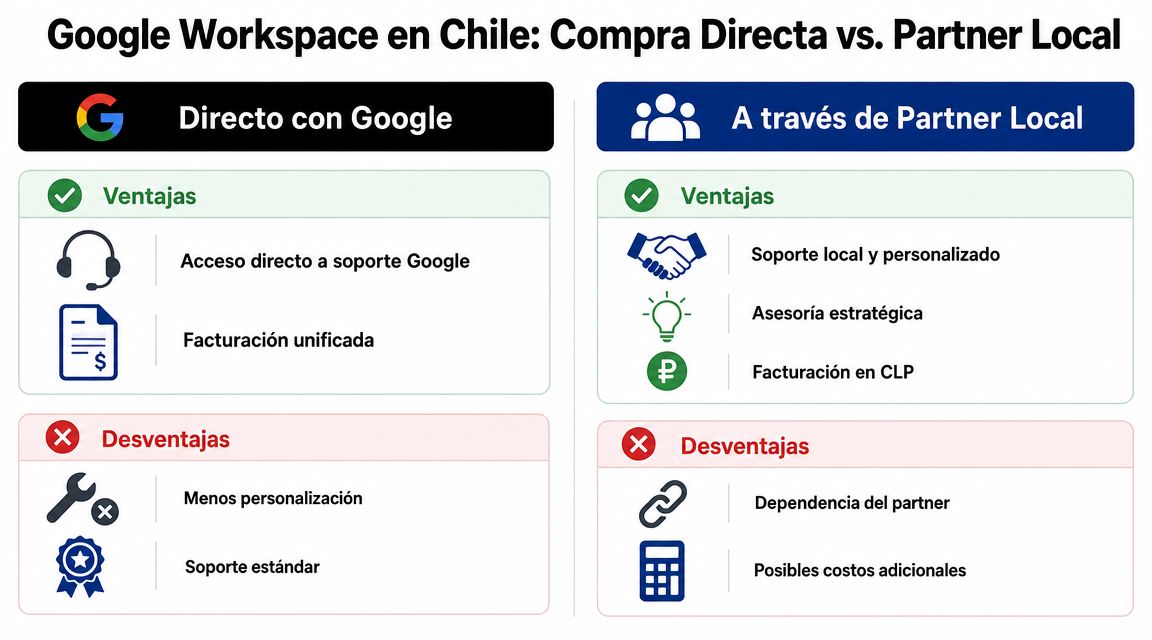
Direct purchase can work if your company already has internal capacity, a solid IT team and a low need for hand-holding. It's a simpler route from a contractual standpoint, but also more standardized.
The local partner adds another layer. It doesn't just sell licenses. It can organize migration, training, support in Spanish and Chilean context for billing and operation. In companies that don't have a mature IT office, that reduces adoption errors.
| Model | Advantages | Disadvantages |
|---|---|---|
| Direct with Google | Direct relationship with the manufacturer, less intermediation, standardized process | Less customization, less local context, more generic support |
| Through a local partner | Local billing in CLP, closer support, accompaniment in migration and governance | Quality depends on the partner, there may be more operational dependence |
Not all resellers contribute the same. The value appears when the partner helps make better decisions, not just when they resell licenses. If your company is evaluating how to organize management and back-office tools, this review of what Nubox is also helps you understand why the software layer must converse with the local administrative structure.
A partner adds real value when it resolves at least three fronts:
The best reseller isn't the one who answers tickets fastest. It's the one who keeps you from turning a software purchase into a new operational problem.
My recommendation is simple. If your company is in an expansion stage, don't buy Google Workspace as a commodity. Buy it as part of a work architecture.
In eCommerce and marketing, speed doesn't depend only on the team's talent. It depends on how many administrative blockers exist between an idea and its execution. That's where Google Workspace can generate real value. Not because it "improves productivity" in the abstract, but because it reduces context switching, file duplication and information loss.
Google has highlighted topics like cloud, AI, SMEs and privacy in Chile, but the public material doesn't provide clear local ROI metrics. That's why the right approach for Chilean companies is to define which processes to automate and how to measure the impact of better collaboration on sales or operational efficiency, beyond the generic talk about the suite (Google for Chile).
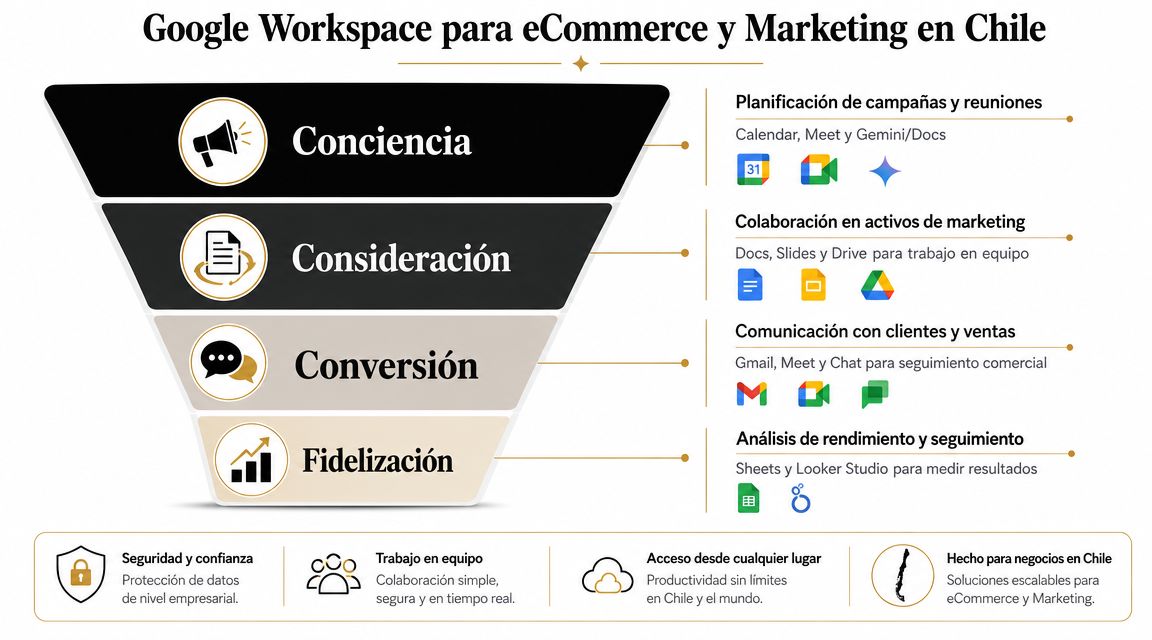
Think of a product launch. Commercial needs margins, marketing needs copy, design uploads assets, performance prepares campaigns, and customer service must know dates and promises. In many companies, each department operates in its own system and the launch is delayed by a basic detail: no one works on a single source of truth.
With Google Drive, Docs, Sheets, Meet and Calendar, that launch can be organized as a unified flow. The assets live in a corporate space, not on individual laptops. The follow-up meeting doesn't start by searching for versions. It starts by deciding.
In a Chilean B2B company, a webinar, a content campaign or a commercial activation usually depends on several approvals. Management reviews messages, legal looks over pieces, sales asks for adjustments and marketing executes. If every change circulates by email with attachments, the cycle gets longer unnecessarily.
Google Workspace works well when the team needs to iterate. A shared document concentrates comments, Calendar aligns milestones, Meet resolves coordination friction, and Sheets can serve as a living base for tracking leads, content or an action pipeline.
It's not magic. It's less friction.
Since there's no local public evidence detailed enough to promise concrete returns in Chile, the right way to evaluate ROI is operational. Look at the impact on processes, not on slogans.
Use questions like these:
If a platform reduces friction between departments, organizes the information and accelerates execution, the ROI doesn't appear in an isolated feature. It appears in better work rhythms.
In companies where the site, the CRM, the content and the commercial operation already demand integration, Google Workspace can be a reasonable base. And when that base connects with a broader digital strategy, players like Bigbuda can support the web growth, automation and performance layer, while Workspace organizes daily collaboration.
A corporate client asks you to answer where their data lives, who can access it and what controls exist if an employee shares a file outside the company. If your team can't answer that clearly, the problem isn't technical. It's about governance.
In Chile, this topic affects sales, audits and operational continuity. It also affects reputation. Google Workspace can fit well in a company that wants to grow with order, but it's worth evaluating it as a platform for corporate control, not as a package of email and documents.
Google indexes customer data for functions like spam filtering, virus detection, spell checking and search, but it doesn't use customer data for purposes unrelated to the service. The admin can also review the status of Data Regions from the corresponding panel to confirm where certain data is stored or processed according to the applied configuration. The point for a Chilean CEO is simple. The platform offers real controls, but your company needs to define what it requires, what it configures and what it supervises.
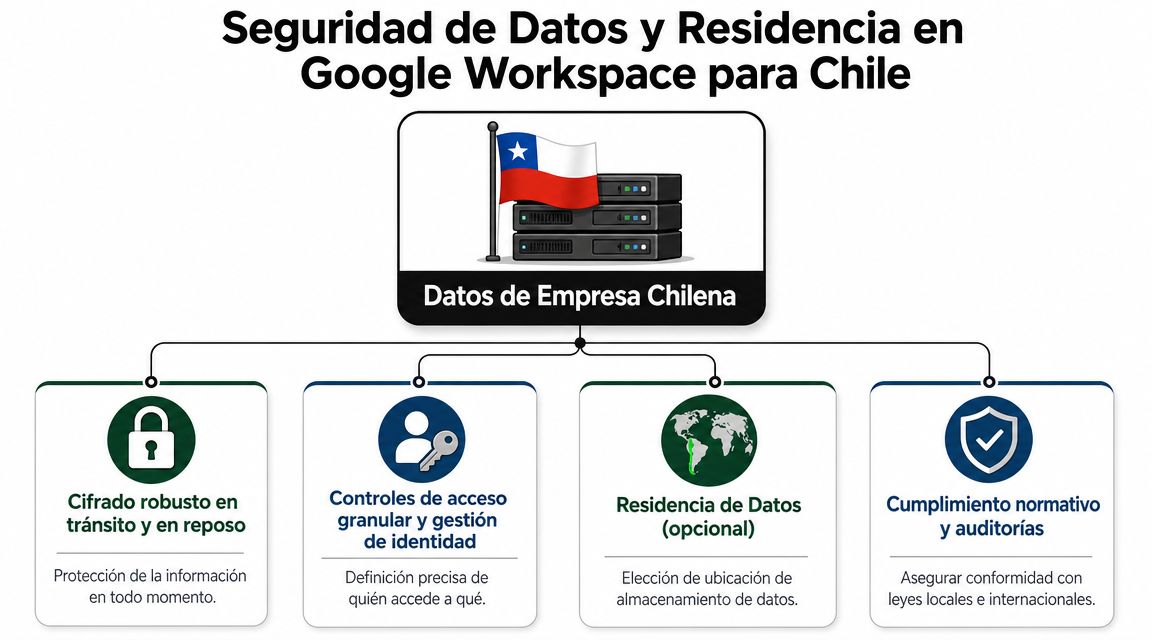
The right decision isn't to trust the provider's brand. It's to design rules.
If your company doesn't organize identity, access, sharing, retention and device management, Google Workspace doesn't fix that disorder on its own. If it does, the cloud usually gives more traceability and more control capacity than an environment full of local files, email forwards and personal accounts used for work.
That nuance matters in Chile, especially in companies that sell to corporations, bid on tenders, manage customer databases or operate with hybrid teams between Santiago, the regions and remote work. In those cases, security isn't just about avoiding incidents. It's about reducing contractual risk, responding better in an audit and depending less on informal practices that slow growth.
It's also worth reviewing this decision alongside a broader reading of the personal data law in Chile.
Data residency doesn't mean the same as full sovereignty, nor does it replace your company's legal analysis. It means you can define, within certain scopes of the product, where covered data from selected applications is stored at rest. For a Chilean company, that's useful if you need to align internal policy, client requirements and compliance criteria with a verifiable configuration.
The practical recommendation is this:
The cloud doesn't replace governance. It exposes it.
My recommendation is direct. Google Workspace can indeed be a good decision for a Chilean company that wants to grow with more operational discipline and better control standards. Don't buy it expecting automatic compliance. Buy it if you're willing to define policies, assign owners and configure the platform properly. That's where the real value appears.
Most comparisons between Google Workspace and Microsoft 365 miss the point. They make feature tables and end in a technical tie. That comparison helps a Chilean CEO little. The real decision isn't which suite has more boxes ticked. The decision is how you want your company to work.
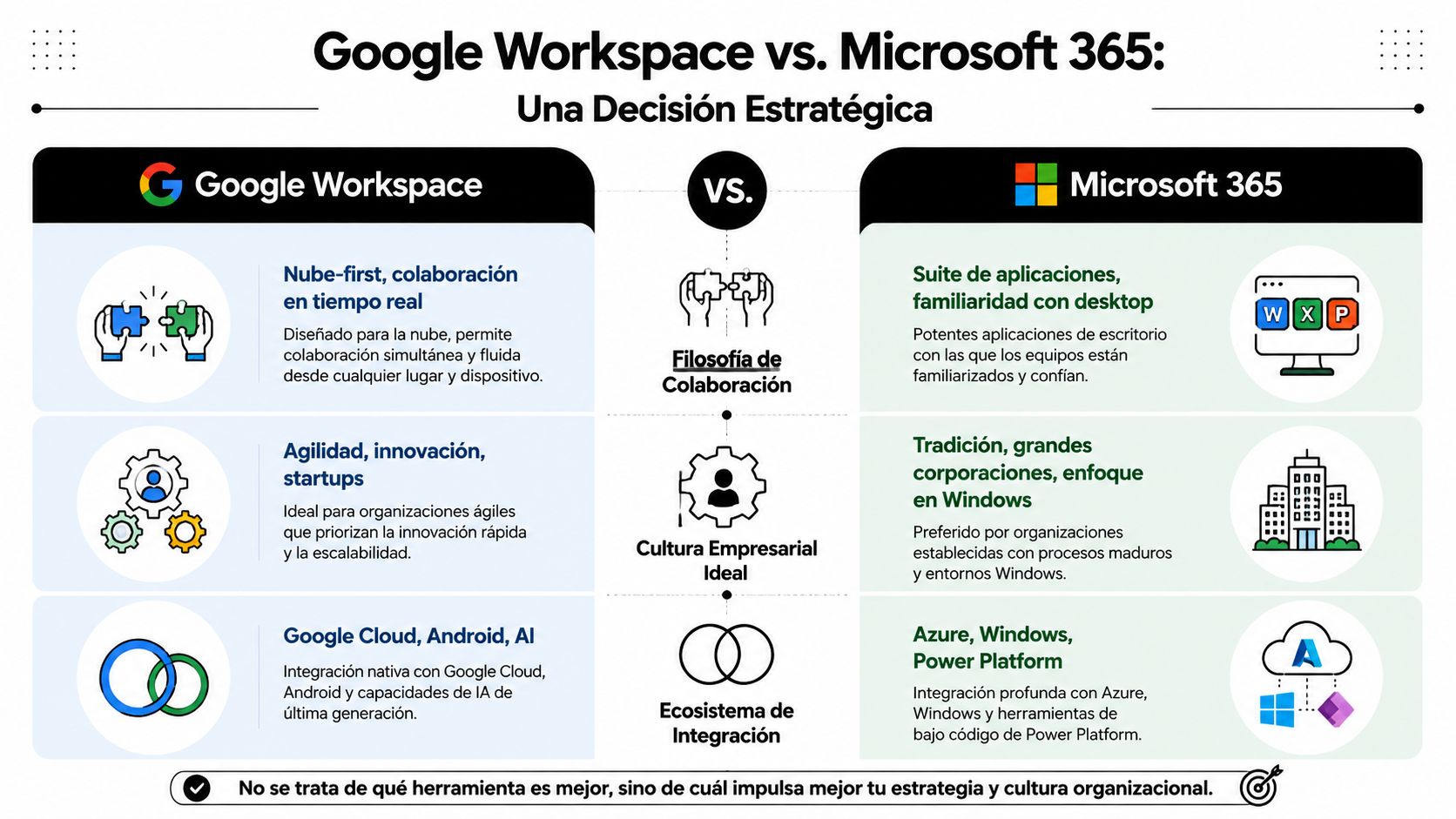
Google Workspace fits better in organizations that already operate with a web mindset, real-time collaboration and less attachment to local files. Its strength isn't only in Gmail, Drive or Meet. It's in how naturally several teams work at the same time on the same environment.
Microsoft 365, on the other hand, usually fits better when the company depends heavily on desktop applications, especially in more traditional structures or with a long history of processes built on Windows, Excel, Word and PowerPoint.
To bring that difference down to earth, it's worth watching this visual comparison.
Google Workspace is usually the more coherent option if your company has several of these characteristics:
Microsoft 365 can be more logical if your company depends on habits and processes deeply anchored to the desktop. Also if there are complex internal flows historically built on the Microsoft ecosystem and the cultural cost of moving them is high.
Don't choose the platform that "wins" on the internet. Choose the one your organization will use consistently.
The useful executive question is this: do you want to modernize the way you work to gain agility, or do you need to reinforce an operation already built on traditional tools? If the answer points to cloud-first collaboration, Google Workspace usually makes more sense.
Most Google Workspace projects fail for a simple reason. They focus on migrating, not on governing. Moving email accounts is easy compared to organizing how the company will work afterward.
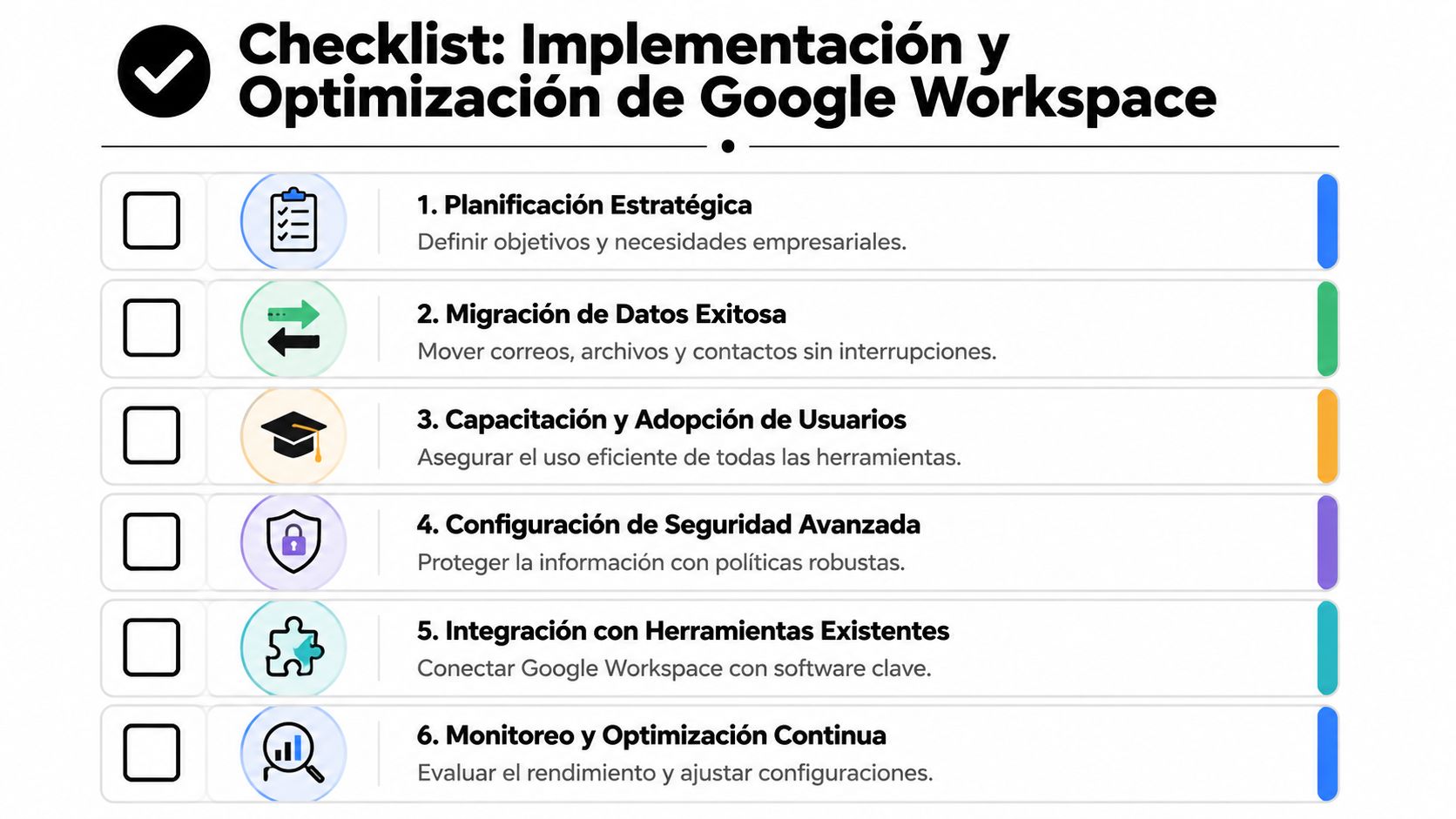
Before activating users, close out these definitions:
A serious implementation starts with an audit of current tools and real frictions. Then comes the usage architecture. Only then is it worth migrating.
Training isn't doing a general demo. It's teaching each team how to use the platform in their daily decisions. Marketing needs collaboration flows. Management needs visibility and control. Operations needs consistency.
Do this well and Google Workspace can turn into an operational asset. Do it badly and it'll be reduced to email, video calls and basic documents.
My final recommendation is concrete. If your Chilean company needs to grow with more order, native cloud collaboration and a more serious base of governance, Google Workspace is a right decision. But don't buy it as software. Implement it as work infrastructure.
If your company is evaluating Google Workspace in Chile as part of a growth strategy, Bigbuda can help you connect that operational layer with your digital performance, from automation and web experience to marketing and conversion processes, so that technology adoption has real business impact.
Related reading: Discover what Google Workspace is: your strategic 2026 guide
No. When a company adopts it with executive judgment, it stops managing isolated tools and starts managing workflows. Collaboration becomes traceable, decisions stay inside the corporate environment instead of scattering across personal channels, and the operation speeds up. In Chile its main advantage is standardizing how distributed teams work.
Do not evaluate only the monthly value per user; the visible cost is the license, the real cost appears when policies, structure and control are missing. Starter suits teams leaving basic disorder behind. The common mistake is starting with the cheapest license and assuming you will fix it later.
Direct purchase can work if your company already has internal capacity, a solid IT team and low need for hand-holding: simpler contractually, but more standardized. A local partner adds another layer, since it can organize migration and training rather than only reselling licenses. Google maintains an official partners page for Chile.
Since there is no local public evidence detailed enough to promise concrete returns in Chile, evaluate ROI operationally. Ask how much time your team loses searching for files or validating versions, how many campaigns are delayed by disorganized approvals, and how many critical assets depend on a single person.
Do not compare only features, compare work cultures. Google Workspace fits organizations with a web mindset, real-time collaboration and less attachment to local files. Microsoft 365 usually fits better when the company depends heavily on desktop applications and flows historically built on that ecosystem. Choose what your organization will actually use.
Because they focus on migrating instead of governing. Moving email accounts is easy compared with organizing how the company will work afterwards. Before activating users, define the business problem you want to solve, how corporate assets will be organized, and what information requires reinforced control and retention.