










Solutions
Explore how to grow

Your company probably already has “productivity tools.” The problem is that it does not have a system. It has email on one side, files scattered across local folders and different clouds, meetings on another platform and approvals living in endless message threads. That disorder is not always visible in the budget, but it does show up in delays, errors, duplicated files and slow decisions.
Need help with this? Discover our digital marketing service.
That is why the right question is not only what is Google Workspace, but what place it occupies within your business operation. If you look at it as a bundle of apps, you will underuse it. If you understand it as the central nervous system of a digital company, the conversation changes. You are no longer buying email and documents. You are standardizing how your team communicates, how information is stored and how work gets done.
Google Workspace is mature enough to take this decision seriously. Google launched this offering in 2006 as Google Apps for Work and rebranded it as G Suite in 2016, and today the platform integrates Gmail, Drive, Docs, Slides, Meet and more into a unified environment for productivity and cloud collaboration, according to the description compiled by TIC Portal on the evolution of Google Workspace. For companies in Chile, that matters because many already operate with hybrid teams, external providers and distributed processes. A fragmented stack slows things down. A unified ecosystem brings order.
Most companies do not lose speed because of a lack of talent. They lose it because of friction. One file is in a personal Drive, another in Dropbox, feedback arrives via WhatsApp, the final version lives attached to an email and nobody knows which document to approve. That digital chaos punishes growing companies the most, because as they add people, campaigns, products and providers, they also multiply the points of failure.
Google Workspace makes sense when you use it to cut that pattern at the root. It does not replace just one tool. It replaces the scattered logic of work. It centralizes email, storage, collaborative editing, calendar and videoconferencing under a single operational layer. That unification lowers internal friction and makes it easier to scale without turning the operation into a maze.
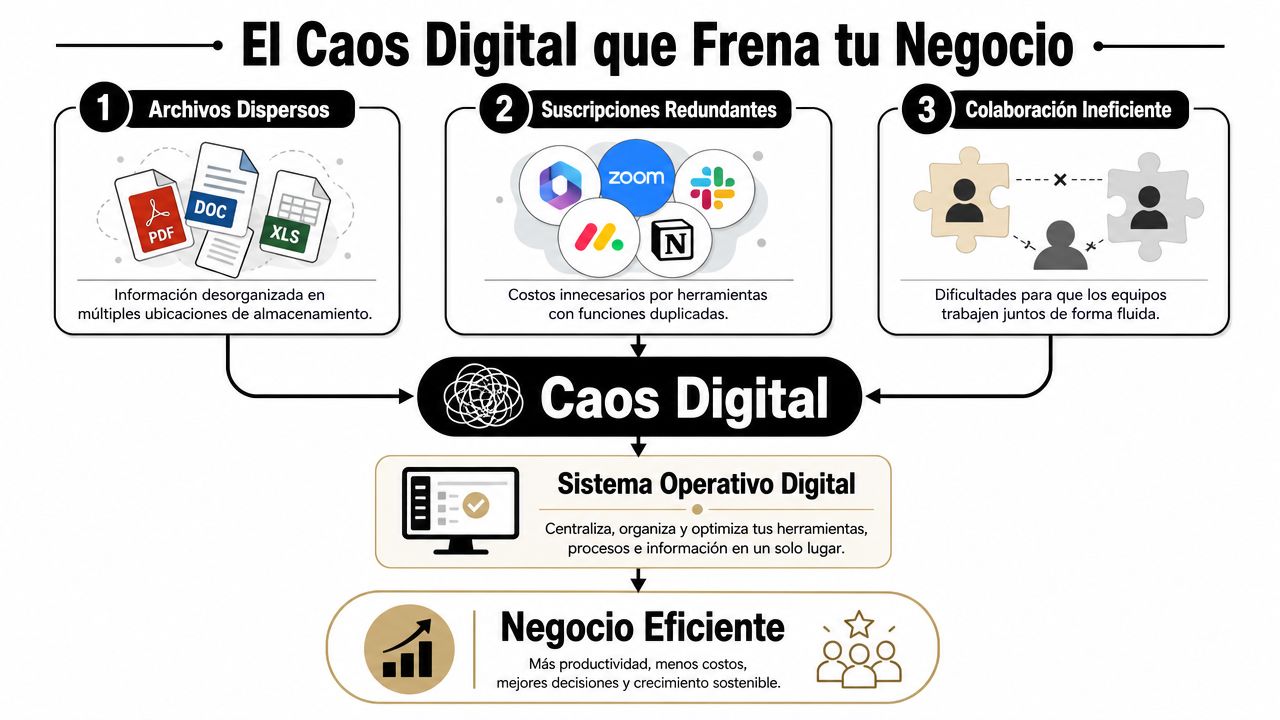
When a company operates with disconnected tools, concrete problems appear:
That is not a minor productivity issue. It is a management problem. A business that takes too long to coordinate also takes too long to launch, fix, respond and sell.
Practical rule: if your team frequently needs to ask “which is the latest version?”, you already have operational debt.
In Chile, many mid-sized companies and eCommerce businesses already operate with hybrid structures. Part of the team works remotely, another part from the office, and several key processes depend on agencies, freelancers, commercial areas and support. In that context, a digital operating system is not a luxury. It is basic infrastructure.
The strategic definition of what Google Workspace is starts there. It is a cloud platform that lets you work from anywhere with centralized administration. And that aligns better with businesses that need order, continuity and control without building a complex architecture for every need.
Google Workspace does not stand out because it has many apps. It stands out when those apps work together without forcing the team to jump between platforms, export files or redo work. According to the official explanation from Google Workspace on what its cloud suite integrates, the key technical value lies in native interoperability between services such as Gmail, Drive, Docs, Sheets, Slides, Meet and Calendar.
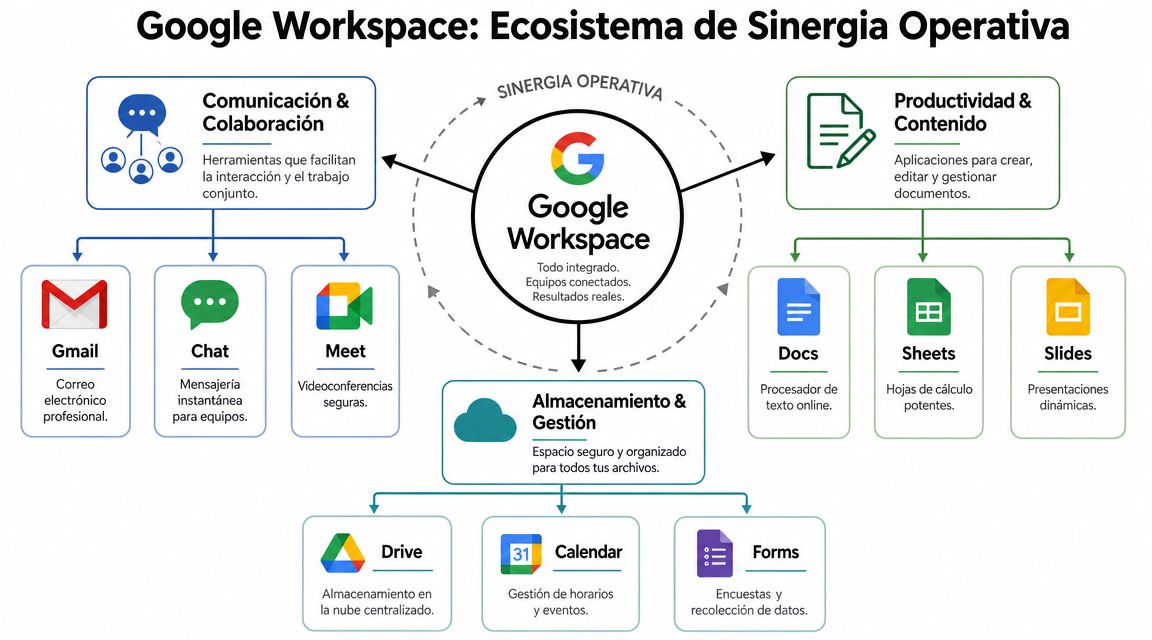
If your operation depends on email, meetings, documents, spreadsheets and shared files, the question is not whether you need those functions. You already need them. The question is whether it is better to manage them in an integrated ecosystem or in a patchwork of solutions.
With Workspace, the value appears at the intersections between tools:
That kind of synergy does not sound spectacular in a demo. In daily operations, it is.
Let's look at the point with business logic, not technical language. A marketing team prepares a campaign. The brief arrives via Gmail, the calendar organizes the kick-off meeting, the creative document is worked on in Docs, the budget plan lives in Sheets, the sales presentation in Slides and all the assets are stored in Drive. If all of that happens on different platforms, the coordination cost grows at every stage.
If it happens within the same ecosystem, the flow becomes cleaner. Less time searching. Fewer version errors. Less blocking between areas.
Companies do not win just by doing more things. They win when they reduce the dead time between a decision and its execution.
If your team currently lives across multiple messaging tools, it is also worth reviewing when to use a dedicated conversational platform and when to concentrate the operation in a unified suite. That difference is easier to understand in this analysis on what Slack is and how it positions itself against other work tools.
Adopting Google Workspace should not be approved as an IT purchase. It should be evaluated as a growth decision. When a company organizes its internal operation, it improves its ability to launch campaigns, respond to incidents, coordinate sales and maintain traceability. That hits margin, speed and control directly.

In eCommerce and marketing, internal slowness is expensive. Not because there is a visible penalty, but because every delayed campaign, every late approval and every lost file reduces the company's commercial capacity. A unified environment helps shorten that cycle.
The most powerful benefit is this: less manual coordination and more real execution. When the content, paid media, design, sales and operations teams work in the same environment, the organization stops fighting with the system and refocuses on the business.
That also improves time-to-market. Not because a tool works miracles, but because it removes absurd obstacles. If catalog approval, legal validation, the commercial calendar and the assets live connected, the launch goes out sooner and with fewer errors.
Google also offers administrative controls that genuinely matter as the company grows. In its documentation for administrators, Google states that Workspace search history is automatically deleted after 18 months by default, and that the administrator can adjust that retention to 3, 18, 36 months or never, in addition to reviewing activity by date and app usage reports, according to the official help on retention and reporting in Google Workspace.
That is not a technical curiosity. It is governance. For a Chilean company that coordinates campaigns, contracts, sales materials and approvals across several people, having clear retention and reporting criteria facilitates internal audit, documentary order and operational control.
| Strategic benefit | What it means in practice |
|---|---|
| Commercial agility | Teams launch and fix things faster |
| Traceability | The company can review activity and organize processes |
| Lower complexity | The dispersion of tools is reduced |
| Scalability | Adding new users and areas becomes more orderly |
If your eCommerce depends on many approvals, you need fewer disconnected tools and clearer rules about how information flows.
The useful comparison is not “which bundle has more features.” That question almost always leads to a bad decision. The right comparison is which work philosophy fits your company best.
Google Workspace was born with cloud-first logic. Its strength is real-time collaboration, ease of use and the ability to operate from a browser and different devices. It is a natural option for companies that prioritize speed, distributed work and less dependence on local files.
Microsoft 365 tends to feel more familiar to organizations with a historical desktop culture, heavy use of traditional Office or a strong dependence on the Windows ecosystem. It can also be a better fit where certain areas require advanced features and work habits deeply rooted in desktop applications.
The decision should not be made out of habit. It should be made based on cultural alignment.
If your company operates with marketing, sales, service and operations teams that need to collaborate quickly and share information without friction, Workspace is usually more coherent. If your operation depends on extremely complex documents, legacy processes or users who work almost entirely from desktop software, Microsoft 365 may make more sense.
| Strategic Criterion | Google Workspace | Microsoft 365 |
|---|---|---|
| Product philosophy | Native to cloud work | Evolution from desktop software |
| Real-time collaboration | Very fluid and simple for distributed teams | Robust, but sometimes more shaped by desktop habits |
| Adoption curve | Tends to be more straightforward for non-technical teams | Can feel more natural in companies used to Office |
| Change governance | Favors a more open and centralized way of working | Can coexist better with more traditional structures |
| Best cultural fit | Digital-first, hybrid or remote companies | Organizations with a historical dependence on Office and Windows |
There is no universal answer. There is a universal bad practice: choosing out of inertia.
For a growing company that needs to launch quickly, organize information and avoid unnecessary complexity, my recommendation usually leans toward Workspace. It has cleaner logic for businesses that want to move fast without turning collaboration into a separate project.
For an organization where finance, legal or certain technical areas depend heavily on very specific desktop application features, the conversation changes. There it is worth seriously evaluating whether Microsoft 365 better protects operational continuity.
The most common mistake is not choosing the wrong tool. It is choosing a platform that contradicts the way the team actually works.
Choosing a plan is not about paying less. It is about not buying an insufficient structure that later limits growth, nor paying for complexity nobody will use. The bad decision appears at both extremes.
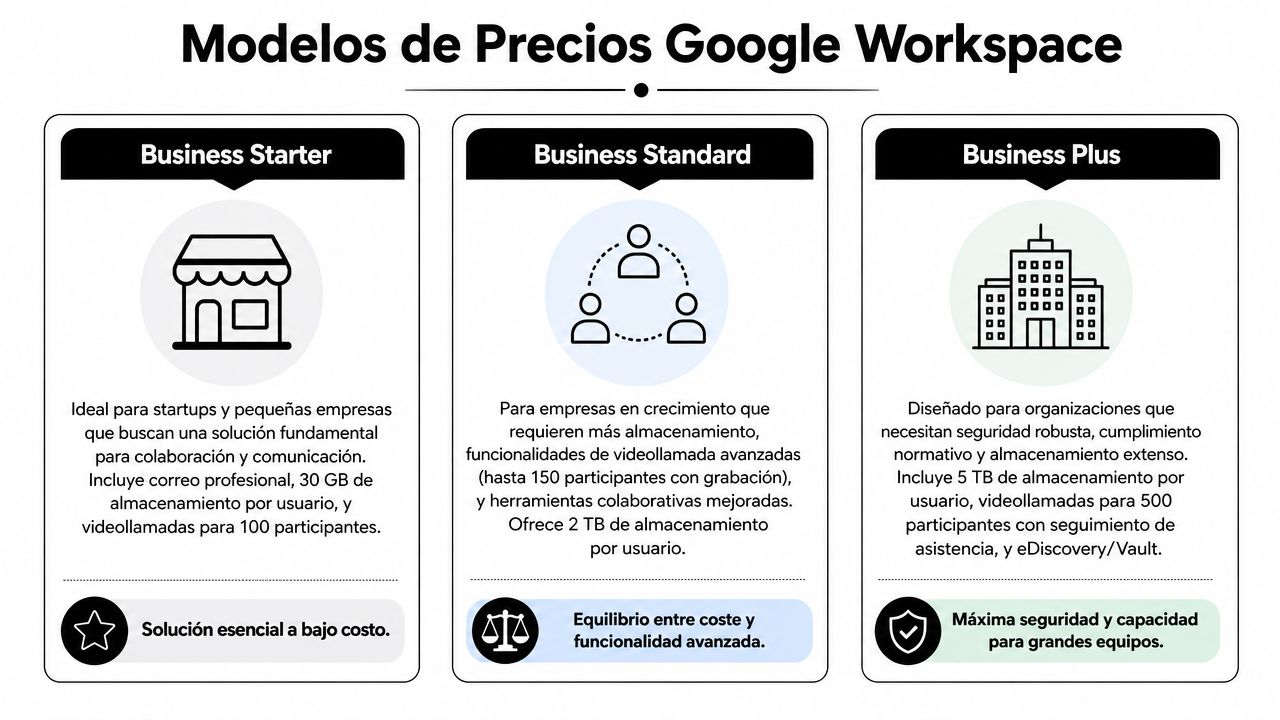
Business Starter usually fits small teams that need professional email, basic collaboration and an orderly structure from the start. It is a reasonable decision when the chaos is still manageable but is already starting to cost time.
Business Standard makes more sense when the operation already depends on shared files more frequently, more important meetings and more intense collaboration between areas. Many companies fall short here if they try to keep operating as if they were still a very small team.
Business Plus responds better to organizations that already need more focus on security, compliance and administration. When the company handles sensitive information or coordinates several areas with more complex flows, moving up a level stops being a luxury.
Enterprise enters the conversation when scale, control and customization weigh more than the simplicity of the starting point.
It is best to choose based on these criteria:
If you are evaluating local options, this analysis on Google Workspace in Chile and its business adoption helps ground the decision based on market and operational context.
Migrating to Google Workspace is not about installing new software. It is about changing how the company works, shares information and manages access. If leadership treats it as an isolated technical task, the project gets more complicated than it should.
The biggest risk usually is not moving emails or files. It is failing to define rules. If nobody decides who has access to what, how files are named, where each type of document lives or how changes are approved, the company moves its disorder to a better platform but keeps operating poorly.
You have to organize before migrating. Not after.
A serious process starts with concrete decisions:
Migrating without governance is digitizing the disorder.
It is also worth assigning an internal owner with real decision-making power. If the project is left solely in the hands of support or an operational person without leadership backing, adoption stalls.
For companies that need external support, one option is to work with a partner that understands both implementation and digital operations. Bigbuda, for example, publishes analysis and content about digital ecosystems and growth, and its article on what G Suite is and how it connects with the evolution of Workspace can serve as a starting point for organizing the strategic framework.
The best way to understand what Google Workspace is is not to see it as a modern office suite. It is to see it as an operational architecture decision. When a company unifies communication, files, meetings and collaboration into a single ecosystem, it stops wasting energy coordinating tools and starts gaining speed in execution.
Not all companies need the same thing. But almost all of them need less dispersion, better governance and a cleaner base to grow. There, Workspace has a clear advantage. It organizes daily work and, at the same time, prepares the organization to operate with more consistency.
If you are evaluating the change, start with three simple moves:
That evidence is worth more than any brochure.
If your company is evaluating how to organize its digital operation, scale collaboration and better connect its stack with growth objectives, you can review the strategic resources from Bigbuda.
It is a cloud platform that lets you work from anywhere with centralized administration. Google launched this offering in 2006 as Google Apps for Work and rebranded it as G Suite in 2016. Today it integrates Gmail, Drive, Docs, Slides, Meet and more into a unified productivity and collaboration environment.
At the intersections between tools. Calendar plus Meet turns a meeting into a coordinated instance with an integrated video call. Drive with Docs, Sheets and Slides keeps files in a centralized, editable environment instead of traveling through attachments. Real-time collaborative editing lets several people review and resolve on the same document.
Google states that Workspace search history is automatically deleted after 18 months by default, and the administrator can adjust that retention to 3, 18, 36 months or never, in addition to reviewing activity by date and app usage reports. That is governance, not a technical curiosity.
Decide by cultural alignment, not by feature count. Workspace was born with cloud-first logic and suits companies that prioritize speed, distributed work and less dependence on local files. Microsoft 365 feels more familiar to organizations with a historical desktop culture or strong dependence on the Windows ecosystem.
Business Starter suits small teams that need professional email and basic collaboration. Business Standard makes sense when the operation depends on shared files and more intense collaboration. Business Plus responds to organizations needing security, compliance and administration. Enterprise enters when scale, control and customization outweigh simplicity.
Migrating without governance is digitizing the disorder. Define an information audit of what really needs to be migrated, a permissions map of who can view, edit, share and administer, governance criteria for storage and naming, an adoption plan by real roles, and a controlled pilot before scaling.