










Solutions
Explore how to grow

Your store gets visits. Your campaigns generate clicks. The sales team responds when it can. And even so, too many opportunities go cold between a simple question, an abandoned cart and a reply that arrives late. That intermediate point between interest and purchase is where many companies lose margin without realizing it.
This is amplified with a good digital marketing service.
That's where understanding how to use whatsapp business stops being an operational question and becomes a growth decision. In Chile, mobile messaging is already part of everyday behavior, and that makes WhatsApp a natural channel for service, post-sale and cart recovery, with an immediacy logic that usually beats traditional email according to the analysis from Trusted Shops on WhatsApp Business. Moreover, WhatsApp Business established itself as a business tool since its launch in 2018 and has already surpassed 50 million users worldwide, according to the review published by Trusted Shops.
The difference isn't in "having WhatsApp." It's in designing it as part of the commercial system. When it connects with the funnel, with lead classification and with the logic of the customer lifecycle, WhatsApp stops being a reactive inbox and becomes conversion infrastructure.
A user arrives from a paid campaign, reviews a product page, hesitates over shipping and leaves. A B2B lead completes a form, but the commercial response arrives hours later, when they've already compared other options. In both cases, the problem isn't only in acquisition. It's in the speed and quality of the contact that happens right before the decision.
That's why WhatsApp Business is best viewed as a conversion channel, not just a service one. Set up well, it adds a conversational layer to the funnel to resolve objections, recover intent and push the next action with less friction. The website keeps doing its job. The CRM keeps organizing the pipeline. Paid media keeps generating demand. WhatsApp connects those pieces at the moment when the lead needs context, confirmation or follow-up.
That point changes the channel's return.
In eCommerce and lead-generation projects, the impact appears when WhatsApp stops being an isolated inbox and becomes part of the commercial system. It serves to answer pre-purchase questions, but also to qualify opportunities, accompany high-intent carts, confirm interest and sustain conversations that don't close on the first visit. That logic fits especially well when the company already works in stages and understands its customer lifecycle, because the right message changes according to the purchase moment.
The app brings useful features from the start: company profile, quick replies, welcome messages, labels, catalog and basic interaction metrics. The mistake appears when availability is confused with strategy. Having those features active doesn't guarantee commercial results if nobody defined which conversations should be opened, which contacts deserve priority and which signals indicate real purchase intent.
I've seen the same pattern several times. A brand installs WhatsApp Business because "you have to be there," adds a button to the site and starts receiving messages. Within a few weeks, the channel fills with repeated questions, low-intent inquiries and disorganized follow-ups. The team responds a lot, but sells little. The difference between a channel that drains time and one that improves conversion lies in operational design: contact origin, the context the agent receives, response times, prioritization criteria and connection with sales or post-sale.
WhatsApp Business works as a conversion engine when it reduces concrete funnel losses. Less abandonment from unresolved questions. Fewer cold leads from delay in the first contact. Fewer conversations without a close for lack of follow-up. That's the right approach for evaluating the channel. Not by the number of messages it receives, but by how much revenue it helps capture that today is slipping away.
A business receives 40 conversations a day and feels that WhatsApp "works." Three months later, marketing sends campaigns, sales tries to follow up, support answers complaints and nobody has full visibility of the customer. The channel is still active, but it's no longer organizing demand. It's mixing it.

The decision between app and API defines whether WhatsApp will be just a touchpoint or a real piece of your commercial system. It's best not viewed as a feature comparison. It's best evaluated by operational impact. How quickly the team responds, how much context it receives before talking to the lead, how much of the conversation is recorded and whether that channel can connect with campaigns, sales and post-sale without depending on one person's memory.
The WhatsApp Business App solves a specific stage of the business well. It serves to organize a small operation, validate demand and professionalize the channel without yet entering a more demanding implementation.
At that stage, the app is usually enough if a single person, or a very small team, handles the conversations and the goal is to respond better, not to design a multichannel operation. It lets you work with a company profile, quick replies, catalog, basic automated messages and labels. That already improves the prospect's experience and reduces internal friction.
It also has an important advantage: the adoption cost is low. It doesn't require development, complex integrations or deep changes in the commercial process. For many SMBs, that point matters more than having more capabilities on paper.
The app fits well when you need to:
The limit appears when WhatsApp stops being an isolated channel and starts intervening in several parts of the funnel. There, responding is no longer enough. You have to coordinate.
The app falls short when marketing needs to know which campaigns generate quality conversations, sales requires history before contacting, and support has to continue the context without asking the customer to repeat everything. In that scenario, the problem isn't the number of messages. It's the lack of structure.
I've seen that breaking point several times. The team responds from the app, jots down data in spreadsheets, refers customers through internal chat and loses traceability every time the shift changes or whoever "knew how the case was going" is absent. The channel stays open, but commercially it becomes opaque.
The WhatsApp Business API comes into play when you need to design a scalable, measurable channel connected with the rest of the stack. Its value isn't in "having more technology." It's in enabling an operation where the conversation triggers processes, records useful data and accelerates commercial decisions.
With the API, a brand can assign conversations among agents, connect flows with eCommerce, trigger automations based on lead origin, record events in the commercial history and use WhatsApp as part of a broader conversion logic. That's the point many guides omit. The API isn't justified by volume alone. It's justified when the channel must integrate with acquisition, nurturing, closing and retention.
The practical difference looks like this:
| Business need | App | API |
|---|---|---|
| Service by one person or a small team | Yes | May be excessive |
| Deep integration with CRM | Limited | Strong |
| Assignment among multiple agents | Limited | Much better resolved |
| Advanced automation | Basic | Stronger |
| Flows connected with marketing and sales | Partial | Much more viable |
If the goal is to connect WhatsApp with Meta Ads campaigns, forms, Shopify, WooCommerce or a commercial pipeline, the API offers a more serious framework to operate. That's where the relationship with a CRM connected to the commercial and follow-up process starts to matter, because each conversation stops being an isolated chat and becomes actionable data.
Not all companies need the API from the start. In fact, implementing it before having a process can add unnecessary complexity. If the volume is still manageable, if the channel doesn't participate directly in acquisition and if the conversations don't require coordination across areas, the app is still a reasonable decision.
The API makes sense when there are already clear signals of operational maturity:
The right choice doesn't depend on which option "has more." It depends on which architecture best supports your current commercial model and the one you want to build in the coming months.
If WhatsApp only answers inquiries, the app may be enough. If WhatsApp must lower cost per lead, recover carts, accelerate closes and sustain post-sale with traceability, the conversation already deserves better-designed infrastructure.
The first message usually arrives at an expensive moment. The brand already paid to attract that visit, that click or that lead. If WhatsApp greets the person with an incomplete profile, vague timing and disorganized replies, the channel starts losing conversion before sales even intervenes.

The initial setup defines how the business is perceived and how the team operates. That's why it's best to start with a number exclusive to the company, complete the registration as a business account and verify it before activating campaigns or driving traffic from ads, email or eCommerce. Separating the personal from the commercial organizes the operation and avoids a frequent problem. Valuable conversations end up scattered, with no clear owner and no useful history for follow-up.
The company profile also serves a commercial function. It's not a formality. It's the channel's first layer of trust.
There are four fields that directly impact conversion:
In CRO, these details weigh more than they seem. An incomplete profile raises friction. A clear profile reduces basic doubts and leaves more room for questions with purchase intent.
The business description influences the quality of incoming conversations. If the text is generic, generic inquiries will arrive. If it clearly explains what you sell, for whom and how the process advances, the channel starts pre-qualifying from the entry point.
It's also worth defining rules before scaling the channel's use. If WhatsApp is going to capture data, refer cases to sales or connect with a CRM, you need a clear criterion for consent, storage and access. That standard should align with your data protection policy for commercial channels and forms.
A simple rule helps audit the profile: each visible field should fulfill one of these functions. Generate trust, guide the purchase or resolve a frequent question.
In many implementations, the catalog gets loaded as an administrative task. That approach wastes a conversion opportunity. Within WhatsApp, the catalog works as an extension of the storefront. It serves to show the offering, organize decisions and lead to the next step without forcing the user to go look for information on their own.
Zendesk's review on the use of WhatsApp Business highlights the operational value of structuring catalog, replies and service within a single commercial flow, with clear product cards and a purchase link when appropriate. For a brand that sells through Shopify, WooCommerce or direct checkout links, that matters for a concrete reason. Fewer steps usually mean less abandonment.
A catalog useful for selling needs three things:
Consistent images
The visual reference should be clear and uniform. If each product seems to come from a different store, trust drops.
Decision-oriented descriptions
It's best to summarize benefits, use context and purchase conditions. The catalog doesn't need long text. It needs to resolve the question that stops the click.
Correct and current links
Each card should push the next action. View product, request a quote, pay or talk to an advisor. If the link fails or sends to an irrelevant page, the channel loses traction.
The welcome, the away message and the quick replies serve an operational and commercial function. They organize expectations, reduce dead time and prevent the team from responding differently to the same question.
A well-thought-out initial setup usually includes:
I've seen the same pattern many times. When this basic layer is well resolved, the dependence on the salesperson who "handles WhatsApp well" drops and the consistency of the whole channel rises. That translates into better response time, fewer lost leads and an operation more prepared to integrate automation later.
Useful automation doesn't try to simulate closeness. It tries to organize demand. If every conversation arrives at the same place, with the same priority and without classification, the team ends up spending high-value time resolving repeated questions and letting more serious opportunities go cold.

The best implementations don't replace people. They take low-complexity work off them so they can intervene where they generate the most impact. In sales, that usually means prioritizing conversations with real intent. In support, it means quickly resolving the standard and escalating only the exceptional.
That changes the way you think about how to use whatsapp business. Instead of asking "which automated messages can I activate," it's better to ask "which decisions can the system make before a human intervenes."
A well-designed initial flow usually takes care of:
Poor automation responds faster. Good automation responds better and routes better.
Simple conversational trees usually perform better than overly ambitious flows. Most businesses don't need a complex experience. They need a clear, organized first layer that's consistent with their operation.
A practical model can look like this:
| Moment | What should happen |
|---|---|
| Start of conversation | Welcome message with clear options |
| Classification | Brief question to detect intent |
| Routing | Assignment to sales, support or post-sale |
| Immediate resolution | Quick reply or sending of the catalog |
| Escalation | Human intervention if the conversation requires it |
The value is in the sequence. If the user arrives from a campaign, it's best not to treat them the same as someone who already bought and needs post-sale. If they arrive from a product page, it's also best not to open with a generic message that ignores that context.
This video shows well how to think about automation from flow and not just from isolated messages.
Here's where the difference between a useful channel and a strategic channel appears. According to the analysis from Wix on WhatsApp Business, the real value lies in integrating it with funnels, CRM and performance, not in using it as an isolated chat. Meta also pushes use cases like click-to-WhatsApp ads and catalogs, which reinforces the logic of a measurable flow from the ad to the close.
That has direct implications for marketing and sales. If a campaign leads to WhatsApp but the team doesn't know which ad generated that conversation, you lose context. If the lead comes in through WhatsApp and is never associated with a source, you lose optimization capability. If the conversation ends in a purchase but nobody attributes it, the channel seems less valuable than it really is.
In more mature operations, automation should fulfill these commercial functions:
When the channel is designed this way, WhatsApp no longer just improves speed. It improves team utilization, the quality of the lead served and the reading of the funnel's real performance.
Many companies open WhatsApp and see a list of chats. A well-organized commercial team should see something else. It should see a pipeline.

Labels are one of WhatsApp Business's simplest features and also one of the most underused. Using them only to distinguish "customer" from "non-customer" falls short. Well thought out, they let you operate the channel as a lightweight CRM.
The right logic isn't thematic. It's commercial. The label has to show which stage the relationship is at and what action comes next.
A functional system usually includes states like these:
If a label doesn't change the priority, the message or the next step, it isn't helping you manage better.
In an online store, labels can organize the operation without making it heavy. A user asking about stock shouldn't be mixed in with another who already received a payment link. Nor with someone who wrote about a shipping problem.
A reasonable model for eCommerce can follow this sequence:
Entry by intent
The chat is labeled by origin or reason. Product, cart, shipping, exchange or payment.
Commercial progress
When the team sends a catalog, link or key reply, the conversation changes state.
Follow-up
Conversations without a close move to a visible queue of pending items.
Close and post-sale
The history stays useful for future campaigns or support.
That lets you respond with more judgment. A customer who abandoned before paying needs a different message than someone who already bought and now asks about shipping. Without labels, both appear as "just another chat." With labels, the reading changes.
In B2B the logic is similar, but with more weight on qualification. A conversation can start with a simple inquiry and evolve into a high-value opportunity. If it isn't classified well, the team loses timing and context.
Here a model closer to a commercial funnel usually works:
| Stage | Use of the label |
|---|---|
| New lead | Came in, but real interest not yet validated |
| Qualified lead | Has a clear need or fit |
| Meeting requested | Requires priority follow-up |
| Proposal sent | Should enter a commercial sequence |
| Negotiation | Involves a more consultative conversation |
| Active account | Moves to relationship management or post-sale |
The advantage of this approach isn't in "organizing chats." It's in facilitating decisions. What to answer first, what type of message to use, when to follow up and when to route. That shortens internal friction and reduces the number of opportunities lost to plain disorganization.
A visitor arrives from a paid campaign, reviews a product, hesitates about shipping or stock and is one click from leaving. If WhatsApp appears with context, that visit can still convert. If it appears as a loose channel, it only adds chats.
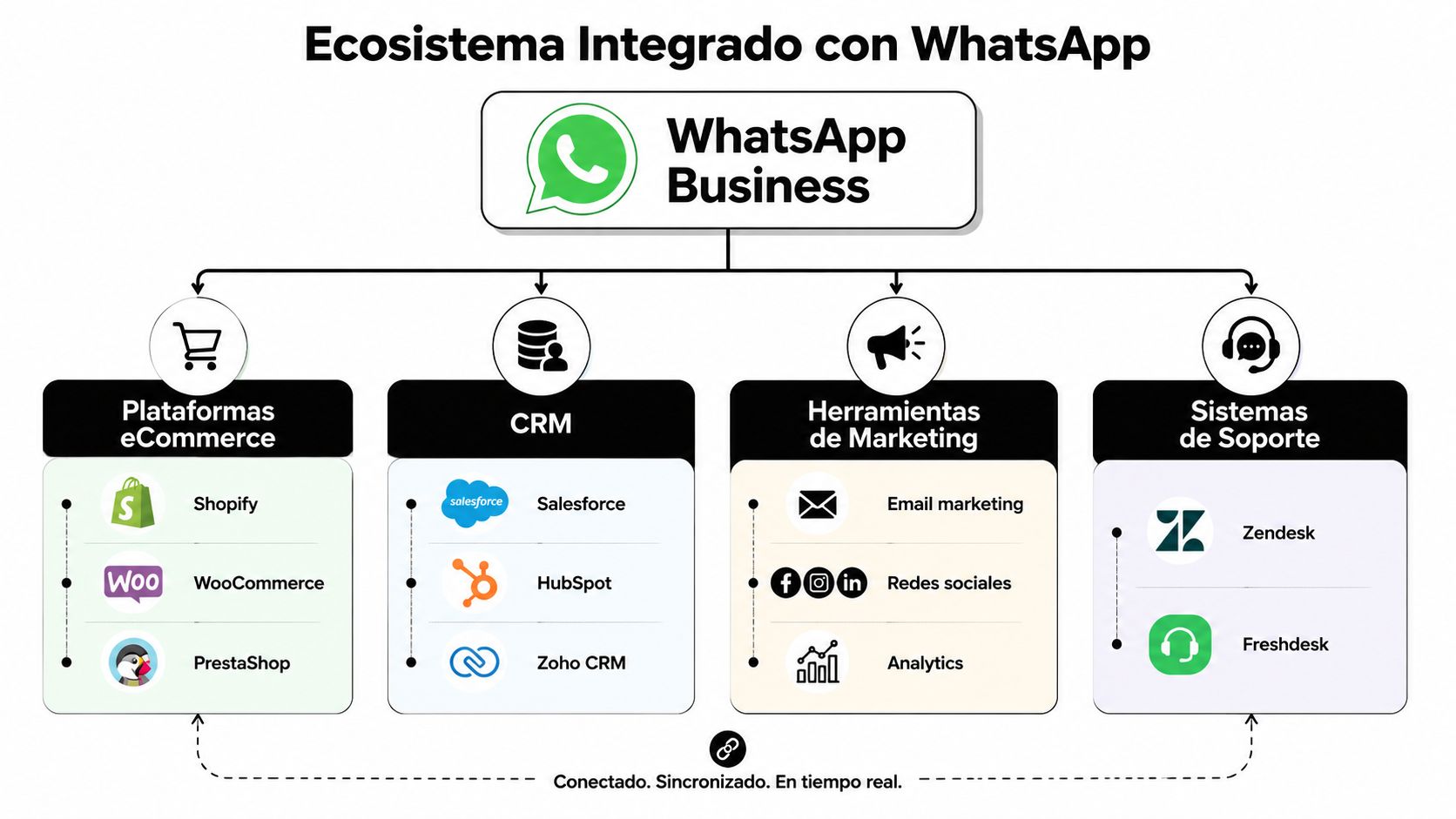
WhatsApp Business performs better when it connects to the site, the CRM, the campaigns and support. That integration turns a conversation into a measurable stage of the commercial journey. For an eCommerce on Shopify or WooCommerce, that changes the channel's function. It no longer serves only to answer questions. It also helps rescue purchase intent, accelerate decisions and sustain post-sale without losing traceability.
The common mistake is treating WhatsApp as a generic floating button. That generates volume, but not necessarily margin or operational efficiency. A well-designed channel appears where friction affects conversion and sends useful information to the team that receives the chat.
That's why it's best to activate it at high-intent points:
The click to WhatsApp has more value when it arrives accompanied by origin, product, campaign or funnel stage. If the team receives a message without context, it goes back to asking basic questions and lengthens a conversation that should advance quickly.
In practice, the best implementations use pre-loaded messages, campaign parameters, site events and CRM synchronization so each chat starts off better. A user who comes from a remarketing campaign shouldn't enter the same flow as someone who wrote from a warranty page. The commercial logic is different. The treatment is too.
Meta explains in its documentation for businesses how WhatsApp Business Platform integrations let you connect conversations with external systems and broader automations, which is key when the channel is already part of the commercial stack: https://business.whatsapp.com/
Not all connections deserve priority at the start. It's best to begin with those that reduce friction in purchase or follow-up and leave useful data for marketing and sales.
| Integration | Expected commercial impact |
|---|---|
| Click-to-chat button on key pages | Captures intent at the moment of greatest doubt |
| WhatsApp connected to forms or landings | Reduces abandonment in acquisition campaigns |
| CRM synced with conversations | Preserves history, source and opportunity status |
| eCommerce platform connected to support | Avoids repeating order, payment or shipping data |
There's a clear trade-off. The more connections you add, the more technical and operational coordination the channel demands. If the foundation is still green, it's best to start with use cases that have visible return, like product inquiries, lead recovery and high-volume post-sale. More sophisticated automation is added afterward.
This point is usually underestimated. If a brand pays for traffic and only offers a form or checkout as an exit, it loses all the users who still need a micro-conversion to advance. WhatsApp introduces an intermediate path. Well implemented, that path recovers part of the demand that already cost money to attract.
That doesn't mean opening chat everywhere without criteria. It means using the channel where a quick response unblocks a purchase, prevents a bounce or accelerates lead qualification. There WhatsApp stops being a service tool and starts operating as a conversion system connected to the rest of the business.
A brand can respond to hundreds of messages a month and still not know whether WhatsApp is selling, filtering well or simply absorbing the team's time. The turning point appears when the channel is measured with commercial criteria, not just operational ones.
In practice, WhatsApp Business adds value when it connects with business decisions: which sources bring conversations with real intent, which response times affect the close rate and which flows convert better by type of inquiry. If that relationship isn't clear, the channel is reduced to an inbox.
The app's native metrics, like messages sent, delivered and read, serve to detect basic friction in the conversation. They let you see whether the problem is in the message open, in the initial proposal or in the team's response capacity.
But that level isn't enough to optimize investment.
When WhatsApp connects to the CRM, the checkout, the form or the site widget, the reading changes. It's no longer just about how many chats come in. What matters is which ones end in a qualified lead, opportunity, sale, repurchase or case resolved without escalating to another channel. That's the difference between watching activity and measuring performance.
If the goal is to increase conversions and lower acquisition cost, it's best to track indicators that connect conversation with result:
This point usually settles many internal debates. Marketing stops measuring only clicks on the WhatsApp button. Sales stops evaluating only the number of chats. Both teams can see which entry produces business and which only adds operational load.
The first reaction is usually to add more automation or more messages. That's not always the way. In several projects, the real problem appears earlier: a generic greeting, a bad routing, wait times mixed between support and sales, or initial questions that don't help qualify.
A useful review of the channel includes four fronts:
Conversation drop-off point
If the user cools in the first messages, you have to adjust the opening, context and next step.
Quality by entry source
A chat started from a product page doesn't behave the same as one captured from a cold campaign.
Response time by intent
Sales, support and post-sale need different queues, SLAs and owners.
Frequent messages and real objections
Quick replies should be updated with useful commercial language, not static templates.
It's also worth reviewing something many companies overlook: the team's ability to close within the same thread. If the advisor responds well but routes late, asks for data that already existed in the system or doesn't pick up open conversations, the channel loses part of its competitive advantage.
WhatsApp performs better when it enters the business's continuous improvement cycle. That means testing opening messages, adjusting triggers, comparing flows by segment, reviewing labels that predict a close and measuring which automations save time without harming conversion.
The trade-off is clear. The more measurement you demand, the more discipline you need in labeling, recording and stage definition. Without that foundation, the channel produces noise. With that foundation, it produces usable learning for marketing, sales and service.
Measuring WhatsApp as a conversational channel integrated into the funnel lets you correct friction, reallocate budget and improve conversion with more judgment. That's where its real impact begins.
The central question is not only how to use whatsapp business. The useful question is how to design it so it helps you sell better, respond with more judgment and sustain a more measurable operation.
When the company treats it as an app, it gets a more organized message inbox. When it treats it as a system, it gets something else. It gains a conversational layer connected with acquisition, classification, follow-up, post-sale and operational learning. That's where its real impact appears.
The difference is in the architecture. App or API, profile or funnel, catalog or simple chat, labels or chaos, integration or silo. Each of those decisions defines whether WhatsApp will be a reactive channel or a long-term commercial asset.
The brands that make the best use of it aren't necessarily the ones that send the most messages. They're the ones that best design the relationship between context, speed, relevance and measurement. That combination makes the channel more useful for the user and more profitable for the business.
If you want to turn WhatsApp Business into a commercial system integrated with your eCommerce, CRM and growth strategy, the team at Bigbuda can help you design a more organized, measurable and conversion-oriented conversational operation.
The app fits when a single person or a very small team handles conversations and the goal is to respond better, not to design a multichannel operation. The API makes sense when several teams need access, attribution already matters, follow-up cannot depend on specific people and the channel must integrate with eCommerce or automations.
Start with a number exclusive to the company, complete the registration as a business account and verify it before driving traffic from ads, email or eCommerce. Four fields affect conversion directly: a clear brand name matching the web and checkout, a precise category, realistic hours and complementary contact channels.
It needs three things: consistent images, because a uniform visual reference sustains trust; decision-oriented descriptions that summarize benefits, use context and purchase conditions instead of long text; and correct, current links that push the next action, whether that is view product, request a quote, pay or talk to an advisor.
Good automation organizes demand rather than simulating closeness. A well-designed first flow identifies intent, whether purchase, support, post-sale, quote or general information, collects minimum context, routes to the right agent or team and leaves a useful record for follow-up. Poor automation responds faster; good automation responds and routes better.
Use them commercially, not thematically. A label should show which stage the relationship is at and what action comes next: new lead, contact initiated, interested in product, quote sent, awaiting reply, sale won, post-sale or recurring customer. If a label does not change priority, message or next step, it is not helping.
Native metrics such as messages sent, delivered and read only detect basic friction. To connect conversation with result, track first response time, qualified conversation rate, progression from chat to commercial opportunity, close rate by origin and value generated by flow type, comparing assisted sales, cart recovery, post-sale and pre-purchase support.