










Solutions
Explore how to grow

In today's digital ecosystem, speed and precision aren't competitive advantages, they're the baseline for survival. Yet many companies find themselves trapped in a cycle of technical dependence that limits their ability to adapt. Every new campaign, every optimization, or every new marketing platform means a ticket to the development team, a wait, and a loss of critical momentum.
At Bigbuda, we can help you with digital marketing services.
This is where Google Tag Manager (GTM) stops being a technical tool and becomes a strategic enabler. Its function isn't simply to "manage tags," but to return control of business intelligence to the marketing team.
If your marketing strategy were a race car, the campaigns and ads would be the engine and the wheels. But Google Tag Manager would be the electronic system that controls everything: the fuel injection, the telemetry, the brakes. It's not just a technical part; it's the brain that gives you the control to react instantly and make race-winning decisions.
Historically, the big handbrake for any marketing team has been its dependence on the development area. Every new tool, every A/B test, or every tracking pixel for a new campaign meant asking for help, waiting in line, and crossing your fingers that it would be implemented in time. A process that could take days, or even weeks. GTM came along to cut that dependence at the root.
By centralizing the management of these tags, GTM transforms the marketing team. They stop being passive requesters and become agile executors. And that agility, today, isn't a luxury; it's what keeps you in the game.
This paradigm shift translates into very concrete business benefits:
At its core, Google Tag Manager isn't about "managing code." It's about taking control of the information that fuels your company's growth. It frees your team from technical constraints so they can focus on what really matters: strategy, experimentation, and optimization. Mastering GTM means going from having analytics as a bottleneck to turning it into a true business accelerator.
For Google Tag Manager to truly shine, it needs a pillar that many overlook or oversimplify: the Data Layer. Forget about seeing it as a technicality. In practice, the Data Layer is the interpreter that translates everything happening on your website into a language your marketing tools can understand to the letter.
Think of it this way: your website and your platforms (like Google Analytics 4, Google Ads, or social media pixels) speak different languages. The Data Layer stands in the middle and ensures that when a user clicks "buy," all the tools hear "sale confirmed" with all the right details, not a confusing noise.
Without a well-structured Data Layer, it's like trying to have a clear conversation in the middle of a concert. The information arrives, yes, but disorganized, incomplete, and, worse still, unreliable.
This conceptual map explains it very well: the development team implements the Data Layer, GTM reads the information it delivers, and sends it in an organized way to the marketing platforms.
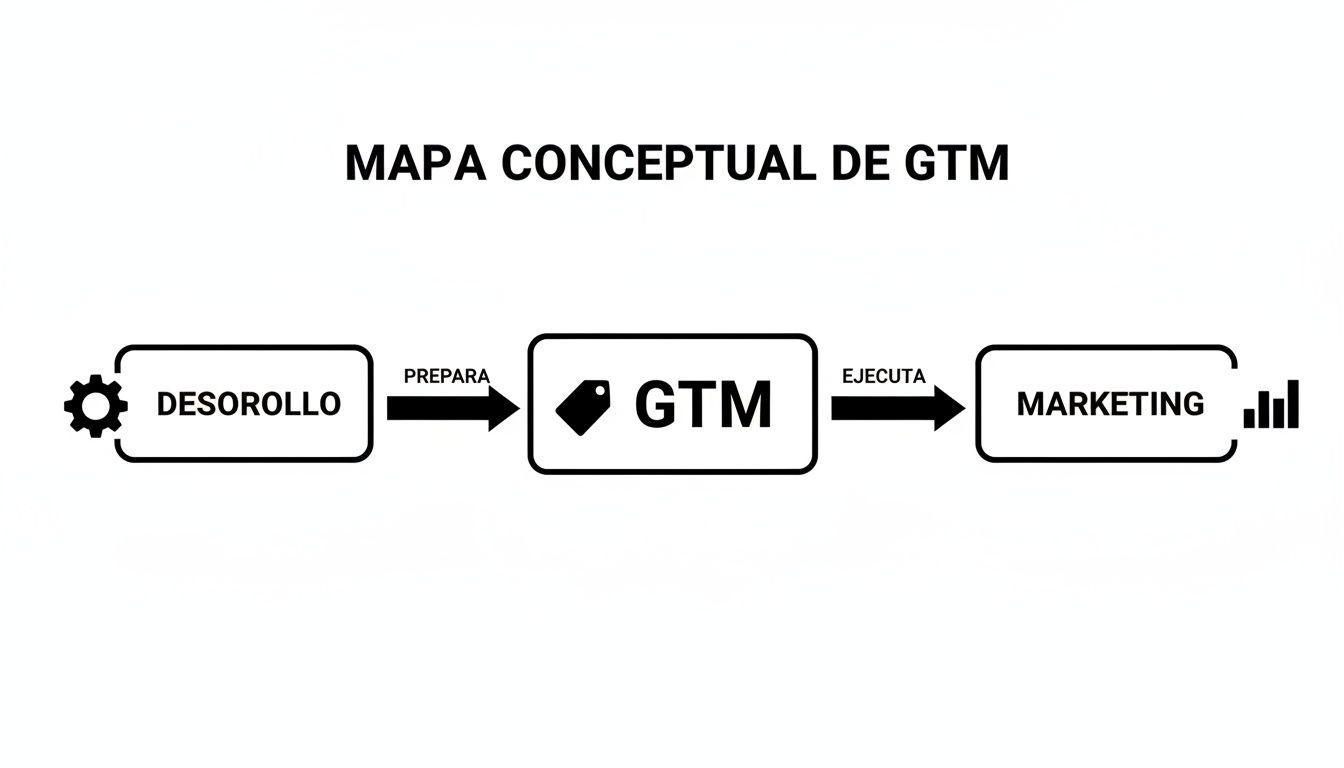
As you can see in the flow, investing time in the Data Layer isn't a technical expense, it's a strategic move. It's the only way to guarantee that the data fuelling your business decisions is high quality.
A robust Data Layer goes far beyond recording a simple visit. It captures key interactions with a level of detail that would otherwise be completely lost in the digital noise.
Setting it up well from the start is one of the most profitable decisions you can make. A classic problem we see in consulting is the "fog" in the conversion funnel. Events are measured poorly, fire multiple times, or simply don't capture what matters, dirtying all the reports. By restructuring the tracking with a standardized Data Layer, the data suddenly becomes crystal clear and it's possible to see where users actually drop off. That's when you realize the problem was never a lack of traffic, but measurement that wouldn't let you see anything.
A well-defined Data Layer is what turns a user's ambiguous behaviour into business intelligence you can use. It's the foundation on which useful conversion dashboards, personalized campaigns, and funnel optimizations that truly move the needle are built.
At the end of the day, having a clean Data Layer is the difference between accumulating data and having the right data. The first only generates confusion and poor decisions. The second is what drives your business's growth, optimization, and profitability. By prioritizing this "translation layer," you're not just collecting information, you're building a strategic asset that boosts every dollar you invest in marketing.
You can see how this data comes to life in our guide on how to create a digital conversions dashboard.
For any eCommerce store, thinking of Google Tag Manager (GTM) only as a tool for measuring visits is stopping halfway. In reality, it's an engine for making business decisions that directly impact profitability.
The true magic of GTM appears when it stops counting visits and starts understanding behaviours. It's the difference between knowing that 1,000 people entered your site and knowing that 50 of them viewed a specific product, 20 added it to the cart, but only 5 completed the purchase. In that detail, in that granularity, is where the growth opportunities hide.

With GTM well configured, we can follow every step of the customer in the conversion funnel, from when they discover a product to when they complete payment.
The agility GTM delivers changes the rules of the game for any marketing team. Imagine you have a hypothesis: "users abandon the checkout when they see the shipping costs." Before, validating this could take weeks waiting for a developer to implement the tracking code. Today, with GTM, you can have an event measuring that interaction in a matter of hours.
This rapid cycle of hypothesis -> test -> learning is the heart of Conversion Rate Optimization (CRO). In practice, GTM allows teams to:
GTM transforms your analytics from a simple report of what happened into a real-time diagnostic system that helps you understand why it happened. You go from speculation to evidence-based answers.
The configurations that really make a difference tend to be the most complex, especially in eCommerce. Think of complete funnel tracking (events like view_item, add_to_cart, begin_checkout, and purchase) integrated with GA4. Here the challenge isn't just placing the tag, but ensuring the data is consistent, that there are no duplicates, and that the flow faithfully reflects the user's real experience.
Perhaps the greatest benefit of mastering Google Tag Manager is its ability to increase conversions using the same traffic you already have. Instead of burning more budget to attract new visitors, the focus is on improving the experience of those who already know you.
This focus on optimization is, by definition, more profitable. By improving your conversion rate, every dollar you invest in advertising goes much further. If you manage to double your conversion rate, in practice you're cutting your cost per acquisition (CPA) in half. That's a change that shows up directly in the business's bottom line. To explore these tactics in more depth, you can review our guide on how to improve the conversion rate in eCommerce.
The following table summarizes how advanced GTM management directly influences the most important performance indicators for an online business.
This table shows how advanced GTM management directly influences the most important performance indicators for an online business, turning measurement into business results.
Key Business MetricProblem without GTM (or with basic use)Strategic solution with GTMConversion RateGeneral view of performance, without knowing why users don't convert. Funnel leaks are invisible.Detailed funnel tracking (add_to_cart, checkout). Lets you identify and fix specific friction points.Cost per Acquisition (CPA)CPA is only optimized by increasing the ad budget. Campaign performance is hard to improve.Creation of dynamic remarketing audiences based on behaviour (products viewed, abandoned carts), improving ad relevance and lowering CPA.Customer Lifetime Value (LTV)Difficulty measuring repeat purchases or the impact of loyalty campaigns. All customers look the same.Implementation of User-ID to track users across devices and sessions. Lets you analyze buying behaviour over the long term.Return on Ad Spend (ROAS)Imprecise attribution. You don't know which channels or campaigns are really generating sales.Advanced conversion tracking with value and currency parameters, enabling precise ROAS measurement per campaign in Google Ads, Meta, etc.
In short, GTM gives the marketing team the control to stop being passive observers and become active participants in growth. It lets you optimize every customer touchpoint and, ultimately, get the most out of every visit.
It's easy to see Google Tag Manager as a simple box where you store your tracking codes, but that's selling it short. Think of GTM more as the operations centre for all your digital marketing. It's the nerve centre that connects, unifies, and makes sense of the data flowing in from all your platforms.
When each tool operates on its own, you end up with isolated reports that don't talk to each other. Data silos are created that make it nearly impossible to make truly intelligent decisions.
The goal is one, and it's strategic: to create a single source of truth. By standardizing the information your website sends through GTM, you ensure that platforms like Google Analytics 4, Google Ads, Meta, or LinkedIn receive exactly the same data. This wipes out the discrepancies that make you doubt your metrics and gives you a solid foundation to optimize your ad budget with total confidence.

The duo of GTM and Google Analytics 4 (GA4) is the backbone of any modern measurement strategy. If GA4 is the brain that analyzes and visualizes the information, GTM is the nervous system that captures and transports it.
With GTM, you can give GA4 context that goes far beyond simple visits. Instead of just knowing that someone viewed a page, you can record specific interactions that demonstrate real interest, such as:
These custom events turn your GA4 reports into a detailed map of user behaviour. It's this depth that lets you understand the why behind the numbers and make decisions based on concrete actions, not simple assumptions.
The connection between GTM and Google Ads is key to getting the most out of your advertising investment. For Google's algorithms to optimize your campaigns efficiently, they need conversion tracking that's flawless.
By configuring your conversions through GTM, you guarantee that the data you send to Google Ads is identical to what you record in GA4. This not only sharpens attribution, but also opens the door to creating far more powerful and specific remarketing audiences. For example, you could create a list with only the users who added products to the cart but didn't buy, and show them ads designed to push them to close that sale.
Managing pixels from platforms like Meta (Facebook/Instagram) or LinkedIn can turn into a real mess. Every new campaign or event to measure usually means pasting more and more code snippets, which increases the risk of errors and, worse still, slows down your site.
GTM solves this headache by working as a central container. You install each platform's base pixel just once and, from there, use GTM to "fire" the specific events (like Lead, AddToCart, or Purchase) when certain conditions are met.
This ensures that your social media campaign data is consistent and reliable, letting you compare performance across channels fairly. In the Chilean market, this capability has been a game-changer. In fact, it has allowed eCommerce managers and agencies to achieve improvements of up to 28% in conversions, according to reported cases, simply by making it easier to implement key events without having to depend on a developer. You can see more about the usage trends of this tool and its impact in BuiltWith's analysis.
At the end of the day, building a unified ecosystem with Google Tag Manager isn't just a technical matter; it's a business decision. It's about tearing down the walls between your data to get a complete view of your customer's journey. A view that lets you make better decisions, optimize your investment, and, ultimately, accelerate your company's growth.
The platform you use—whether WordPress, Shopify, or Webflow—completely conditions your measurement strategy with Google Tag Manager. Each one has its own rules and quirks, and understanding them is essential so your technical team can build something that drives the business, rather than holding it back. It's not about becoming a technical expert, but about being able to make strategic decisions with the right information.
A good GTM implementation has to be solid, scalable, and, above all, aligned with commercial goals. This goes far beyond simply copying and pasting a code.
Shopify is a tremendous platform for eCommerce, but it has a known problem: complete tracking of the buying funnel. Its ecosystem is fairly closed, which makes customizing the checkout enormously complicated. The result? A "blind spot" in the data, right at the most decisive moment of the customer journey.
As a business leader, the key instruction for your team is one: they need access to Shopify Plus. This is the only version that allows editing the checkout.liquid file, an absolutely necessary step to implement a Data Layer that properly captures the begin_checkout and purchase events with all their details. Without that access, funnel measurement will always be partial and will depend on workarounds that, frankly, aren't as reliable. If your business operates on Shopify and funnel optimization is a priority, this point is non-negotiable. If you want to better understand the differences between platforms, you can review our analysis of WooCommerce vs. Shopify.
In WordPress, flexibility is its greatest virtue and, at the same time, its greatest danger. The strategic question here isn't whether GTM can be implemented, but how to do it without sacrificing the site's performance and security. The classic dilemma is whether to use a plugin or insert the code manually.
From a business perspective, the decision should weigh the following:
The guideline for leaders is simple: don't rely on plugins as a definitive solution. A manual implementation, even if it involves a slightly higher initial cost, is a direct investment in your operation's stability and scalability.
Webflow is positioning itself as a platform that achieves a great balance between ease of use and enormous flexibility for developers. This makes it the ideal terrain for deploying an advanced, fully custom Data Layer, laying the groundwork for a top-tier measurement strategy.
Unlike other platforms that tend to impose more restrictions, Webflow's architecture makes it easy to insert custom scripts capable of feeding a Data Layer with highly contextual information.
Thanks to this, you can go far beyond measuring the typical events. For example, it's possible to capture highly specific interactions with interactive elements, complex forms, or content that changes dynamically. For a leader, this means one thing: granular data on user behaviour that's pure gold for personalizing the experience and optimizing conversions. The strategic guidance here is clear: leverage Webflow's flexibility not just for design, but to build a data ecosystem that powers every marketing and sales decision.
Without discipline, a Google Tag Manager container degrades over time. What started as an agile tool for the marketing team ends up turned into a technical burden: a maze of broken tags, inconsistent data, and a website that becomes, almost imperceptibly, slower and slower.
For those who lead marketing, implementing a governance framework isn't an option, it's the only way to ensure that measurement scales alongside the business and not against it. It's about building a tracking system that's predictable, easy to maintain, and, above all, reliable. Without clear rules, every new person or agency that touches the container adds their own "logic," creating a mess that, sooner or later, collapses.
Governing GTM is the difference between having a well-tuned engine and a pile of loose parts that no one knows what they're for anymore.
An overloaded, disorganized GTM container directly impacts the site's load speed. This deterioration not only hurts SEO, but also negatively affects the user experience and, therefore, the conversion rate. A clean GTM is, in essence, an investment in the business's performance.
The first thing to avoid chaos is to establish strict, consistent naming for everything that lives inside the container: tags, triggers, and variables. If there's no standard, finding or debugging a specific tag becomes a task of digital archaeology.
A logical, descriptive naming structure lets anyone on the team understand at a glance what a component does, which campaign it serves, or what data it's sending. For example, a convention like [Platform] - [Event Type] - [Detail] (for example, GA4 - Event - AddToCart) is infinitely more useful than a generic name like "New tag."
Modifying a GTM container directly in production is the equivalent of changing a plane's engine mid-flight. A small error can break all the live measurement, contaminate the data, and lead to business decisions made with incorrect information.
The solution is to implement rigorous environment management. The recommended practice is to separate the work into at least three containers: development, staging, and production. This way, any change can be created, tested, and validated in a safe environment before moving to the next one. This methodology drastically reduces errors and lets tracking scale without generating conflicts.
Finally, documentation is what holds the whole system together. Every implementation, every complex configuration, and every strategic decision about measurement should be clearly documented. Think of it as the "user manual" for your GTM; its value is incalculable when new people join the team or when you collaborate with external agencies.
A well-governed GTM doesn't just guarantee the accuracy of your data. It protects your marketing investment by ensuring decisions are based on a solid, reliable source of truth. It's the scaffolding that lets your data operation grow in an orderly, efficient way. Ultimately, without chaos.
Here we'll clear up the most common doubts that arise in marketing teams and among business leaders about Google Tag Manager. The answers focus on the real impact for the company, beyond the pure technical side.
From a business standpoint, the complexity isn't in a specific tag, but in building a measurement ecosystem that's coherent and complete. The most challenging implementations, without a doubt, are those that aim to unify multiple data sources and custom events, especially in an eCommerce store.
Think of it this way: configuring end-to-end tracking of a buying funnel, from when someone views a product to when they pay, and integrating all of that with GA4, requires surgical precision. The real challenge is to guarantee that the data reflects the customer journey without duplicates or information gaps. If you don't do it well, you end up making business decisions based on a fiction, not on reality.
One of the most costly problems we see constantly is blindness in the conversion funnel. In many projects, we've found that the tracking events were poorly configured or, worse still, fired multiple times. This not only dirties the data, but also hides the real leak points where you lose customers.
By restructuring the Google Tag Manager (GTM) implementation and standardizing how events are named and triggered, the data suddenly becomes reliable. That's when you can see with total clarity at which exact step users leave and start to understand why. This shows that often the problem isn't a lack of traffic, but deficient measurement that prevents you from acting.
The key to not spending hours and hours debugging data is discipline from minute zero. This means working with a clear structure: well-defined events, consistent naming for everything, and always relying on tools like GTM's preview mode and GA4's DebugView.
Even more important is validating every change in a real browsing context, not just in isolated tests. This ensures the data captures user behaviour exactly as it happens in practice.
Efficiency in debugging isn't something you achieve at the end of the road, but something you build from the start. An orderly, methodical implementation is the best vaccine against hours lost trying to decipher inconsistent data.
For your measurement system to grow without turning into chaos, it's essential to organize GTM containers by separating environments. At a minimum, you should have a container for development, another for staging (testing), and the definitive one for production. This gives you a safe space to test any change without risking breaking the data collection on your live site.
In addition, it's crucial to adopt strict naming and document every tag, trigger, and variable you create. This discipline is what drastically reduces errors, eases long-term maintenance, and lets your tracking evolve in an orderly way alongside your business, without accumulating technical debt.
At Bigbuda, we don't just implement GTM; we design measurement systems that power intelligent business decisions. If you want to turn your data into a strategic asset for growth, discover how our methodology can help you.